
Let me start with a small story from my classroom. It shows why email etiquette matters so much.
A few years ago, a bright B.Com student came to me. She was upset. She had applied for an internship at a good company, but she never got a reply. She showed me the email she had sent. It said:
“Hey Sir, I want the internship. Please tell me what to do. My CV is attached.”
There was no subject line. The CV was named final2.pdf. And the email came from an address like cutiepie_2004@…
Now, be honest with yourself. If you were the manager, would you hire this person?
Probably not. And the sad part is this: she was a good student. Her English was fine. Her marks were good. But her email did not show any of that.
We rewrote it together. The new email looked like this:
Subject: Application for Accounts Internship – B.Com (Second Year) Student
Dear Sir/Madam,
I am writing to apply for the Accounts Internship at your company. I am a second-year B.Com student at XYZ College, Mumbai. I have attached my CV for your kind consideration.
I would be grateful for an opportunity to learn and contribute. Thank you for your time.
Yours faithfully,
Sneha Kulkarni
Mobile: 98XXXXXXXX
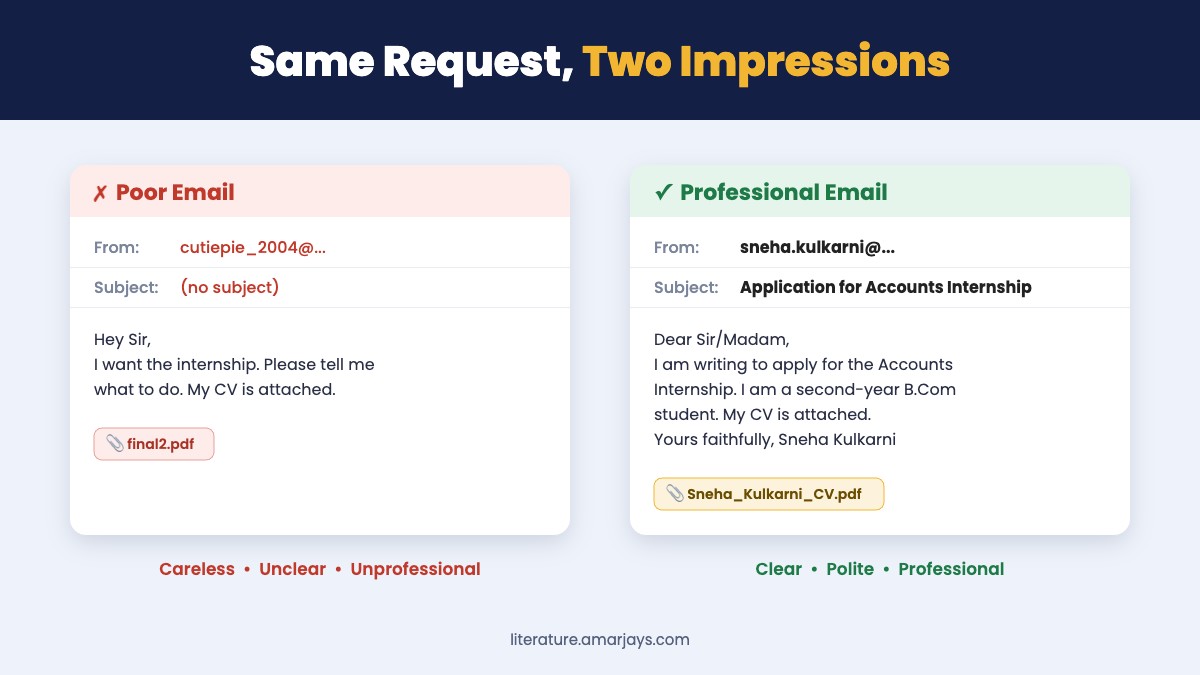
Same student. Same marks. Same CV. But now she looks serious and professional. She got a call within a week.
If you are thinking, “Oh no, I have written emails like the first one,” do not worry. Almost all of us have. The good news is that email etiquette is easy to learn. You do not need difficult English. You only need a few simple rules. And that is exactly what this article will teach you.
Why Emails Matter So Much
Think about how often emails are used. Colleges send notices by email. Companies send interview calls by email. Banks, offices and clients all use email. Very often, your email is the first thing a person sees about you, even before they meet you.
When you meet someone face to face, they can see your smile, hear your voice and notice your body language. In an email, they see only your words. This is the big difference between oral and written communication. So your words have to do all the work.
That is why email etiquette is an important part of Business Communication Skills. A small mistake can create a big problem:
- A missing subject line can make your email look like spam.
- A rude sentence can upset your manager.
- A wrong attachment can embarrass you in front of a client.
- A careless “Reply All” can send a private message to fifty people.
Here is something I tell every batch of students: good English alone is not enough. You may know grammar very well, but if your tone is rude, your subject line is empty, or your request is unclear, the reader will still feel confused or annoyed. Tone, structure, politeness and clarity matter just as much as grammar.
So it is better to learn good email etiquette now, in college, before you enter the workplace. Let us begin.
What Is Email Etiquette?
Simple Definition
Email etiquette means the simple rules we should follow while writing professional emails. These rules help us write emails that are clear, polite, professional and suitable for the reader.
Easy Explanation
The word “etiquette” simply means good manners. Email is one of the most common methods of communication today, so these manners matter a lot. You already know table manners: do not talk with food in your mouth, say “please” and “thank you”. Email etiquette is the same idea. It is good manners for emails.
Remember it like this:
Email etiquette = Writing emails in a Clear, Polite, Professional and Appropriate way.
- Clear – The reader understands your message in one reading.
- Polite – You use respectful words like “please”, “kindly” and “thank you”.
- Professional – You avoid slang, SMS language and silly email addresses.
- Appropriate – Your style suits the reader. You write to your principal differently from how you write to your classmate.
Real-Life Example
Imagine you need notes from your professor.
❌ “Sir send notes of unit 3 fast. Exam is near.”
✅ “Dear Sir, Could you please share the notes for Unit 3 of Business Communication? Our exam begins next week, and the notes will help me revise. Thank you.”
Both emails ask for the same thing. But the second one follows good email etiquette: it is clear, polite and respectful. The professor will be happy to help.
One-Line Memory Rule
“Write every email as if your future boss will read it.”
Why Is Email Etiquette Important in Business Communication?
Email etiquette is important because it creates a good first impression, shows respect, avoids confusion and saves time. A clear and polite email makes the reader trust you and act on your request quickly. Here are ten reasons, explained simply. You will notice that many of them connect to the 7 Cs of Communication you study in class.
- It creates a professional impression. Your email speaks for you before you speak. A neat email tells the reader, “This person is serious.”
- It shows respect. A proper greeting and a polite request show that you value the reader’s time. Example: “Dear Ma’am” feels respectful; “Hey” may not.
- It prevents misunderstandings. If you write “Meeting tomorrow,” the reader may ask, “What time? Where?” If you write “Meeting on 15 October at 11 a.m. in Room 204,” everything is clear.
- It saves time. A clear email gets a clear reply. Nobody has to write back and ask questions.
- It makes communication clear. When you follow a structure, your main point does not get lost.
- It shows professionalism. Correct spelling, proper format and a signature show that you take your work seriously.
- It helps build trust. When clients and managers receive correct, timely emails from you again and again, they start trusting you.
- It reduces unnecessary back-and-forth. One complete email is better than five half-emails. For example, if you are submitting a form, attach it, mention the deadline and give your roll number in the same email.
- It helps students in future jobs. Placement officers, HR teams and managers notice how you write. Good email habits can quietly help your career.
- It represents you and your organisation. When you write from an office email, you are not writing only for yourself. You are writing on behalf of your company or college.
20 Golden Rules of Email Etiquette Everyone Should Know
This is the heart of the article. These email etiquette rules are simple, but they make a big difference. Read each rule slowly. For every rule, you will see why it matters, a wrong example, a better example and a small tip from my years of teaching.
Rule 1: Write a Clear Subject Line
Why it matters: The subject line tells the reader what the email is about before they open it. Busy people decide what to read first by looking at subjects.
❌ Wrong: (no subject) or “Hello”
✅ Better: “Request for Leave from 12 to 14 October”
Teacher’s Tip: If the reader can guess your whole message from the subject line, you have written a great subject line.
Rule 2: Use an Appropriate Greeting
Why it matters: The greeting sets the tone. It is like saying “Good morning” when you enter someone’s office.
❌ Wrong: “Hey bro,” (to a manager)
✅ Better: “Dear Mr. Deshmukh,”
Teacher’s Tip: When in doubt, start with “Dear”. It is never wrong in a formal email.
Rule 3: Know Your Reader
Why it matters: You do not talk to your principal the way you talk to your best friend. Emails work the same way.
❌ Wrong: “Hi Principal, need to talk. When free?”
✅ Better: “Respected Sir, I would like to meet you to discuss the Annual Day arrangements. Please let me know a convenient time.”
Teacher’s Tip: Before typing, ask yourself: “Who is reading this, and how would I speak to them in person?”
Rule 4: Start with the Purpose
Why it matters: Readers want to know quickly why you are writing. Do not make them search for it.
❌ Wrong: “I hope you are fine. The weather is very nice these days. I was thinking about many things and…”
✅ Better: “I am writing to request an extension for my project submission.”
Teacher’s Tip: Your purpose should appear in the first two lines.
Rule 5: Keep the Email Short
Why it matters: Long emails tire the reader. Important points get missed.
❌ Wrong: A 15-line paragraph explaining every small detail of why you were absent.
✅ Better: “I was absent on 5 October due to fever. I have attached the medical certificate.”
Teacher’s Tip: Most professional emails can be written in 5 to 10 lines. If you need more, use short paragraphs or points.
Rule 6: Use Simple Language
Why it matters: Simple words are understood quickly. Difficult words do not make you look smart; clear words do.
❌ Wrong: “I hereby beseech your esteemed self to kindly expedite the dispatch of the aforementioned document.”
✅ Better: “Could you please send the document soon?”
Teacher’s Tip: If you would not say a word aloud in an office, do not write it in an email.
Rule 7: Be Polite
Why it matters: People help those who are polite. A rude email makes people defensive.
❌ Wrong: “Send me the fee receipt.”
✅ Better: “Could you please send me the fee receipt?”
Teacher’s Tip: “Please”, “kindly” and “thank you” cost nothing but earn a lot.
Rule 8: Avoid Slang
Why it matters: Slang is fine with friends. In professional emails, it looks careless.
❌ Wrong: “The event was awesome, totally lit!”
✅ Better: “The event was very successful.”
Teacher’s Tip: Keep your fun language for WhatsApp with friends.
Rule 9: Avoid SMS Language
Why it matters: Short forms like “u”, “pls” and “thx” look lazy in professional emails.
❌ Wrong: “Pls send d form 2day. Thx.”
✅ Better: “Please send the form today. Thank you.”
Teacher’s Tip: Typing full words takes only two extra seconds. Those two seconds protect your image.
Rule 10: Check Spelling and Grammar
Why it matters: Mistakes make the reader doubt your seriousness. Some mistakes even change the meaning.
❌ Wrong: “I am writing to apply for the post of Accountent. Please find my resume attach.”
✅ Better: “I am writing to apply for the post of Accountant. Please find my resume attached.”
Teacher’s Tip: Read your email aloud once. Your ears will catch mistakes your eyes miss.
Rule 11: Use a Professional Email Address
Why it matters: Your email address is part of your first impression.
❌ Wrong: rockstar_rahul99@…, princess.pinky@…
✅ Better: rahul.patil@…, rahulpatil.bcom@…
Teacher’s Tip: Create one simple email ID with your real name. Use it for college, internships and jobs.
Rule 12: Be Careful with “Reply All”
Why it matters: “Reply All” sends your reply to everyone on the email. Many people do not need your answer.
❌ Wrong: Clicking “Reply All” to a college notice sent to 300 students just to say “Ok, noted.”
✅ Better: Reply only to the sender, or do not reply at all if no reply is needed.
Teacher’s Tip: Before clicking “Reply All”, ask: “Does every person here need to read this?”
Rule 13: Check Attachments Before Sending
Why it matters: Forgetting the attachment, or attaching the wrong file, is one of the most common email mistakes.
❌ Wrong: “Please find my assignment attached.” (Nothing is attached.)
✅ Better: Attach the file first, then write the email.
Teacher’s Tip: Make it a habit: attach first, write later.
Rule 14: Mention Attachments Clearly
Why it matters: The reader should know what is attached and why.
❌ Wrong: (A file is attached, but the email does not mention it.)
✅ Better: “I have attached my CV and my B.Com marksheet (Semester IV) for your reference.”
Teacher’s Tip: If you attach more than one file, list them by name.
Rule 15: Use CC and BCC Correctly
Why it matters: CC and BCC decide who sees your email and who sees whose address. Wrong use can cause confusion or privacy problems.
❌ Wrong: Putting 100 customers’ addresses in the CC field, so everyone can see everyone’s email ID.
✅ Better: Put customers in BCC so their addresses stay private.
Teacher’s Tip: We will learn CC and BCC in detail later in this article.
Rule 16: Avoid Unnecessary CAPITAL LETTERS
Why it matters: In emails, capital letters feel like shouting.
❌ Wrong: “PLEASE SUBMIT THE FORM BY MONDAY.”
✅ Better: “Please submit the form by Monday, 12 October.”
Teacher’s Tip: If you want to highlight something, use bold for a few words instead of capitals.
Rule 17: Avoid Excessive Emojis
Why it matters: Emojis can look childish in formal emails, and the reader may understand them differently.
❌ Wrong: “Thank you so much Ma’am 😍🙏🙏🔥🔥”
✅ Better: “Thank you very much, Ma’am.”
Teacher’s Tip: In formal emails, use no emojis. With close colleagues in a friendly team, one simple smiley is usually fine.
Rule 18: Do Not Write Angry Emails
Why it matters: Words written in anger stay forever. An email can be forwarded, printed and saved.
❌ Wrong: “This is the worst service ever. You people are useless.”
✅ Better: “I am disappointed with the delay in delivery. Could you please tell me when I will receive my order?”
Teacher’s Tip: Angry? Write the email, but do not send it. Wait at least ten minutes. (More on this later.)
Rule 19: Read the Email Once Before Sending
Why it matters: One quick reading catches wrong names, wrong dates and missing words.
❌ Wrong: “Dear Mr. Joshi” in an email meant for Mr. Jadhav.
✅ Better: Check the name, date and attachment once before you click Send.
Teacher’s Tip: Add the recipient’s email address last. That way, you cannot send an unfinished email by mistake.
Rule 20: End with an Appropriate Closing
Why it matters: A proper ending makes the email feel complete and polite.
❌ Wrong: Ending suddenly with “Ok bye” or no closing at all.
✅ Better: “Thank you for your time.
Regards,
Priya Nair
TYBCom, Roll No. 42″
Teacher’s Tip: “Regards”, “Kind regards” and “Thank you” are safe closings for almost every professional email.
How to Write the Perfect Email Subject Line
What Is a Subject Line?
Good email etiquette begins even before the reader opens your email. The subject line is the short heading of your email. It appears in the inbox before the reader opens the email. Think of it as the title of a chapter. It tells the reader what is inside.
Why Is It Important?
- It helps the reader decide which email to open first.
- It helps the reader find your email later.
- An empty or vague subject line may make your email look like spam.
What Makes a Good Subject Line?
- It is short (about 5 to 10 words).
- It is specific. It tells the exact topic.
- It includes useful details like a date, name, course or job title.
- It does not use all capitals or many exclamation marks.
What Makes a Bad Subject Line?
- It is empty.
- It is too general, like “Hi” or “Request”.
- It is too long, like a full paragraph.
- It sounds like an alarm: “URGENT!!! READ NOW!!!”
15 Subject Line Examples: Bad vs Better
| No. | ❌ Bad Subject Line | ✅ Better Subject Line | Why the Better One Works |
|---|---|---|---|
| 1 | Hi | Request for Leave on 10 October | Tells the purpose and the date. |
| 2 | Important | Submission of Business Communication Assignment – Roll No. 23 | The teacher knows the subject and the student. |
| 3 | Please read | Change in Seminar Timing: 3 p.m. Instead of 11 a.m. | The key change is visible in the inbox itself. |
| 4 | Internship | Application for Marketing Internship – B.Com Student | Mentions the role and who is applying. |
| 5 | Job | Application for the Post of Junior Accountant (Ref. JA-12) | Gives the post and the reference number. |
| 6 | Notes | Request for Unit 3 Notes – Business Communication (FYBCom) | Clear unit, subject and class. |
| 7 | Problem | Complaint: Damaged Product Received – Order No. 45821 | The company can trace the order quickly. |
| 8 | Meeting | Request for Meeting to Discuss Annual Day Budget | Explains the reason for the meeting. |
| 9 | Following up | Follow-Up: Interview for Sales Executive on 5 October | Reminds the reader of the exact interview. |
| 10 | URGENT!!! | Fee Payment Deadline Extended to 20 October | Calm, clear and informative. |
| 11 | Doubt | Query About Eligibility for Merit Scholarship 2026–27 | The office knows exactly which scheme you mean. |
| 12 | Thank you | Thank You for the Guest Lecture on Digital Marketing | Shows what you are thanking them for. |
| 13 | Documents | Documents for Admission Verification – Ankit Sharma | Says what is attached and for whom. |
| 14 | Request | Request for Recommendation Letter for MBA Application | States the type of request clearly. |
| 15 | Hello Sir, I wanted to ask you about the project that we discussed in class last week | Query About Final-Year Project Topic | Short and to the point. Details go in the body. |
Subject Line Formula: Purpose + Topic + Key Detail
Example: Request (purpose) + for Leave (topic) + on 10 October (detail)
How Should You Start a Professional Email?
The greeting (also called the salutation) is the first line of your email, and it is the first place where your email etiquette shows. Choosing the right greeting is easy once you know the reader.
| Greeting | When to Use It |
|---|---|
| Dear Sir/Madam | When you do not know the name of the person. Example: a job application to an HR department. |
| Dear Mr. Sharma | When you know the name of a man. Use his surname. |
| Dear Ms. Patil | When you know the name of a woman. “Ms.” is safe because it does not depend on marriage. |
| Dear Professor / Dear Professor Iyer | When writing to a college teacher. |
| Dear Dr. Singh | When the person has a doctorate or is a medical doctor. |
| Respected Sir / Respected Ma’am | Common in Indian colleges and offices when writing to principals or senior officers. |
| Hello Mr. Sharma | Slightly less formal. Good for people you work with regularly. |
| Hi Rahul | Only for colleagues or classmates you know well, in a friendly setting. |
Greetings That Are Too Casual for Professional Emails
- ❌ Hey bro
- ❌ Hi buddy
- ❌ What’s up?
- ❌ Yo!
- ❌ Hiii Sirrr
These are fine with friends. But in a professional email, they break basic email etiquette and make you look careless.
Remember this simple rule: Start formal. If the other person replies in a friendly way (“Hi Neha”), you can slowly become a little less formal too.
The GREET Formula: A Simple Way to Structure Any Email
Many students ask me, “Sir, what should I write after ‘Dear Sir’?” Here is a formula that solves this problem. I call it the GREET formula.
📌 Save This: The GREET Formula
G – Greeting: Say hello properly. (“Dear Ma’am,”)
R – Reason: Say why you are writing. (“I am writing to…”)
E – Explain: Give the important details.
E – Expected action: Say clearly what you want the reader to do.
T – Thank and sign off: End politely with your name.
Let Us Use GREET to Write an Email
Situation: You want to change your elective subject.
Subject: Request to Change Elective from Economics to Marketing
[G] Dear Ma’am,
[R] I am writing to request a change in my elective subject.
[E] I am a student of SYBCom, Division B (Roll No. 18). I had selected Economics as my elective, but I would now like to take Marketing, as I plan to do an MBA in Marketing.
[E] Could you please let me know if this change is possible and what steps I need to follow?
[T] Thank you for your help.
Regards,
Aditya More
SYBCom, Div. B, Roll No. 18
See how easy email etiquette becomes with a formula? Every part has a job. Nothing is missing, and nothing is extra.
Parts of a Professional Email
Let us now look at every part of an email, one by one. Knowing these parts is the first step in professional email etiquette.
- Sender (From): Your email address. Keep it simple and professional.
- Recipient (To): The main person who must read and act on your email.
- CC (Carbon Copy): People who should know about the email but do not need to act. Everyone can see who is in CC.
- BCC (Blind Carbon Copy): People who receive the email secretly. Others cannot see their addresses.
- Subject: A short heading that tells the topic of the email.
- Greeting: The opening, such as “Dear Sir” or “Dear Ms. Rao”.
- Opening sentence: The line that tells the purpose. Example: “I am writing to enquire about…”
- Main message (Body): The details: dates, facts, reasons. Keep paragraphs short.
- Request/Action: What you want the reader to do. Example: “Please confirm by Friday.”
- Closing: A polite ending like “Thank you” followed by “Regards”.
- Signature: Your name and useful details like class, designation or phone number.
- Attachment: Any file you send with the email, such as a CV, assignment or certificate.
Before and After: 10 Real Email Makeovers
This is my favourite part to teach, because students can see email etiquette in action immediately. Read the poor email first and try to spot the mistakes yourself before reading the improved version.
1. Asking a Teacher for Leave
Situation: A student needs two days’ leave for a family wedding.
❌ Poor Email:
Subject: (none)
sir i will not come 2 days. marriage in family. pls grant leave
✅ Improved Email:
Subject: Leave Application for 14 and 15 October
Dear Sir,
I request leave for 14 and 15 October, as I need to attend my cousin’s wedding in Pune. I will complete any missed work after I return.
Thank you for your understanding.
Regards,
Rohan Sawant
FYBCom, Div. A, Roll No. 31
Why it is better: It has a subject, a proper greeting, exact dates, a reason, a promise to catch up and full student details.
2. Asking a Professor for Notes
Situation: A student missed a lecture.
❌ Poor Email:
Hi mam, send yesterdays notes. i was absent.
✅ Improved Email:
Subject: Request for Notes on Barriers to Communication
Dear Ma’am,
I was absent for yesterday’s lecture on Barriers to Communication because I was unwell. Could you please share the notes or tell me which pages of the textbook I should read?
Thank you, Ma’am.
Regards,
Kavya Menon
FYBCom, Div. C
Why it is better: It names the topic, gives a reason, asks politely and offers an easier option (textbook pages). (By the way, if you want to revise this topic, read our simple notes on barriers to communication.)
3. Applying for an Internship
Situation: A student wants a summer internship in digital marketing.
❌ Poor Email:
Subject: internship
Hello, I want internship in ur company. CV attached. Reply fast.
✅ Improved Email:
Subject: Application for Digital Marketing Internship (Summer 2027)
Dear Sir/Madam,
I am a second-year BMS student at ABC College, Mumbai, and I would like to apply for a summer internship in your Digital Marketing team. I manage the social media pages of our college fest and have completed a short online course in SEO.
I have attached my CV for your consideration. I would be happy to share any further details.
Thank you for your time.
Yours faithfully,
Meera Joshi
Mobile: 98XXXXXXXX
Why it is better: It introduces the student, shows relevant skills, mentions the attachment and ends politely without pressure.
4. Applying for a Job
Situation: A fresh graduate applies for an accountant job.
❌ Poor Email:
Subject: Job
Dear sir, I am looking for job. I have done bcom. Plz give me chance. Thank u.
✅ Improved Email:
Subject: Application for Junior Accountant Position
Dear Ms. Kapoor,
I am writing to apply for the Junior Accountant position advertised on your website. I completed my B.Com in 2026 with 78% and have working knowledge of Tally and MS Excel.
My CV is attached. I would welcome the chance to discuss how I can support your accounts team.
Thank you for considering my application.
Regards,
Siddharth Rane
Mobile: 98XXXXXXXX
Why it is better: It names the job, gives qualifications and skills, and sounds confident instead of begging.
5. Asking a Manager for Leave
Situation: An employee needs a day off.
❌ Poor Email:
Subject: Leave
Not coming tomorrow. Personal work.
✅ Improved Email:
Subject: Leave Request for 20 October
Dear Mr. Fernandes,
I would like to request a day’s leave on 20 October for some personal work. I have completed the weekly sales report, and Anjali has agreed to handle any urgent client calls.
Please let me know if this is fine.
Thank you,
Nikhil Gupta
Sales Executive
Why it is better: It asks rather than informs, and it shows that work will not suffer.
6. Sending an Assignment
Situation: A student submits an assignment by email.
❌ Poor Email:
Subject: (none)
(Only an attachment named “doc1.pdf”. No message.)
✅ Improved Email:
Subject: Submission of Assignment on 7 Cs of Communication – Roll No. 12
Dear Sir,
Please find attached my assignment on the 7 Cs of Communication (file name: Tanvi_Shah_7Cs_Assignment.pdf).
Kindly let me know if you need any changes.
Regards,
Tanvi Shah
FYBCom, Div. B, Roll No. 12
Why it is better: The teacher knows whose assignment it is, which topic it covers, and the file has a clear name.
7. Requesting Information from a Company
Situation: A student wants to know about a certificate course.
❌ Poor Email:
Tell me about ur course fees n timing.
✅ Improved Email:
Subject: Enquiry About Weekend Course in Financial Accounting
Dear Sir/Madam,
I came across your Weekend Course in Financial Accounting on your website. Could you please share the following details?
1. Course fees
2. Class timings
3. Start date of the next batch
Thank you in advance.
Regards,
Pooja Verma
Why it is better: Numbered questions make it easy for the company to reply to each point.
8. Complaining About a Service
Situation: A customer’s internet has not worked for three days.
❌ Poor Email:
Subject: WORST SERVICE!!!
Your internet is GARBAGE. 3 days no net. Fix it NOW or I will cancel!!!
✅ Improved Email:
Subject: Internet Not Working Since 8 October – Account No. 774512
Dear Customer Support Team,
My home internet connection has not been working since 8 October. I have restarted the router several times, but the problem continues. I also called your helpline on 9 October (Complaint No. 55621), but the issue is still not solved.
Could you please send a technician at the earliest? I work from home, so this is affecting my work.
Thank you,
Arjun Nair
Mobile: 98XXXXXXXX
Why it is better: It is firm but polite, gives account and complaint numbers, and asks for a clear action. Calm complaints usually get faster help.
9. Following Up After an Interview
Situation: A candidate wants to thank the interviewer.
❌ Poor Email:
Hi, any update on my selection??
✅ Improved Email:
Subject: Thank You – Interview for Customer Relations Executive
Dear Ms. D’Souza,
Thank you for meeting me yesterday for the Customer Relations Executive position. I enjoyed learning about your team and how you support customers.
I am very interested in this role and look forward to hearing from you.
Regards,
Fatima Shaikh
Mobile: 98XXXXXXXX
Why it is better: It is thankful, positive and patient instead of pushy. For more help, see our tips on how to handle psychology during an interview.
10. Requesting a Meeting
Situation: A Students’ Council member wants to meet the principal.
❌ Poor Email:
Sir we want to meet you tomorrow. Its about fest.
✅ Improved Email:
Subject: Request for Meeting About College Fest Arrangements
Respected Sir,
On behalf of the Students’ Council, I request a short meeting with you to discuss the arrangements for our college fest in December. We would like your guidance on the budget and the venue.
We are available any day this week between 11 a.m. and 2 p.m. Please let us know a time that suits you.
Thank you, Sir.
Regards,
Varun Pillai
General Secretary, Students’ Council
Why it is better: It explains the purpose, gives time options and lets the principal choose. That is respectful.
Email Etiquette Every College Student Should Learn
Now think about your own college. Email etiquette for students is not very different from email etiquette at work. You write to teachers, the HOD, the principal, the office and placement cell. Each one needs a slightly different approach.
Writing to Teachers
- Always mention your name, class, division and roll number. Your teacher may have 300 students.
- Name the subject and topic clearly.
- Do not send emails late at night expecting an instant reply.
Writing to the HOD
- Be a little more formal. Use “Dear Sir/Ma’am” or “Respected Sir/Ma’am”.
- Write to the HOD for department matters like a change of subject or a problem with a course. For small doubts, contact your subject teacher first.
Writing to the Principal
- Use the most formal style.
- Keep it short and respectful.
- If needed, CC your class teacher or HOD so that they are informed.
Sending Assignments
- Use a clear subject with topic and roll number.
- Give the file a proper name.
- Send it before the deadline, not at 11:59 p.m.
Asking for a Recommendation Letter
- Ask at least two to three weeks before you need it.
- Remind the teacher which class they taught you and in which year.
- Attach your CV and mention the deadline and where the letter should be sent.
Internship and Scholarship Applications
- Read the instructions carefully. If they ask for a PDF, do not send a Word file.
- Mention the scheme or role name exactly as written in the advertisement.
- Attach all documents asked for, and only those.
Placement Communication
- Reply to placement emails quickly, especially when they ask you to confirm attendance.
- Never ignore an interview invitation. If you cannot attend, inform them politely.
- Remember that the placement cell also tells companies about student behaviour.
Job Applications
We will look at this in detail in a separate section below.
Email Etiquette at the Workplace
Once you start working, email etiquette becomes part of your daily routine. You will email many kinds of people. Here is the most important idea: the same email style does not suit everyone. Adjust your tone like you adjust your voice when speaking to different people.
| Reader | Suitable Style | Example Line |
|---|---|---|
| Manager | Respectful, clear, to the point | “I have completed the report. Please let me know if you would like any changes.” |
| Team members | Friendly but professional | “Hi team, here is the plan for Monday’s client visit.” |
| Clients | Polite, formal, helpful | “Thank you for your order. Your delivery is scheduled for 18 October.” |
| Customers | Warm, patient, solution-focused | “We are sorry for the trouble. Our team will call you within 24 hours.” |
| HR department | Formal and exact | “Please find attached my signed offer letter and ID proof.” |
| Senior officers | Very formal, brief | “Respected Sir, I seek your approval for the attached proposal.” |
| Colleagues | Friendly, simple | “Could you share the updated sales sheet when you get a moment?” |
| External organisations | Formal, with full details | “We would like to invite your organisation to our career fair on 5 November.” |
Formal vs Informal Email: What Is the Difference?
Email etiquette depends on how formal the situation is. If you want to understand this idea more deeply, read our detailed guide on formal vs informal communication.
| Feature | Formal Email | Informal Email |
|---|---|---|
| Purpose | Official work: applications, requests, complaints | Personal or friendly messages |
| Language | Standard, correct English | Everyday, relaxed English |
| Tone | Polite and respectful | Friendly and casual |
| Greeting | Dear Sir/Madam, Dear Mr. Rao | Hi Neha, Hello friends |
| Closing | Regards, Yours faithfully, Yours sincerely | Cheers, Take care, See you |
| Vocabulary | Full words; no slang | Short forms and light slang are fine |
| Emojis | Not used | Can be used |
| Structure | Clear: greeting, purpose, details, request, closing | Flexible, like a conversation |
| Examples | Job application, leave request to principal | Email to a friend about a trip |
Quick Example
Formal: “Dear Ms. Bhatt, I am writing to confirm my attendance at the workshop on 22 October. Regards, Amit.”
Informal: “Hi Riya! I’ll be there for the workshop next week. Let’s go together? :)”
How to Sound Polite Without Sounding Weak
Tone is the most delicate part of email etiquette. Some students think that being polite means begging. That is not true. You can be polite and confident at the same time.
Look at these two sentences:
❌ “Send me the report.”
✅ “Could you please send me the report by 4 p.m.?”
The second one is polite, but it is also clear and firm. It even gives a deadline.
- Politeness means using kind words.
- Respect means valuing the other person’s time and position.
- Directness means saying clearly what you need.
- Professional tone is the balance of all three.
Avoid over-politeness like “Sorry to disturb you, I know you are very busy, I am really sorry, but if possible, only if you have time…” This sounds nervous. One “please” is enough.
10 Direct Sentences Made Polite and Professional
| No. | ❌ Rude or Too Direct | ✅ Polite and Professional |
|---|---|---|
| 1 | Send me the file. | Could you please send me the file? |
| 2 | You did it wrong. | I think a few changes are needed here. |
| 3 | Reply fast. | I would appreciate a reply by Thursday. |
| 4 | Why didn’t you send it? | I have not received the file yet. Could you please check? |
| 5 | I want a refund. | I would like to request a refund for this order. |
| 6 | Call me. | Please call me when you are free. |
| 7 | This is not my job. | I think this may be handled better by the accounts team. |
| 8 | You forgot the attachment. | It seems the attachment is missing. Could you please resend it? |
| 9 | I can’t do it. | I am unable to do this today, but I can complete it by tomorrow. |
| 10 | Tell me the fees. | Could you please tell me the fee details? |
Useful Professional Email Phrases
Starting an Email
- I am writing to…
- I am writing to enquire about…
- I hope you are doing well.
- Thank you for your email.
Making a Request
- Could you please…?
- I would be grateful if you could…
- Would it be possible to…?
- I request you to kindly…
Asking for Information
- Could you please tell me…?
- I would like to know…
- Please let me know…
Giving Information
- I would like to inform you that…
- Please note that…
- Here are the details you asked for.
Apologising
- I am sorry for the delay in replying.
- I apologise for the mistake.
- Sorry for any trouble this may have caused.
Following Up
- I am following up on my email dated…
- I just wanted to check if you had a chance to look at…
- Could you please give me an update on…?
Thanking
- Thank you for your help.
- Thank you for your quick reply.
- I appreciate your time.
Ending an Email
- Please let me know if you need any more information.
- I look forward to your reply.
- Regards / Kind regards / Best regards
- Yours faithfully (when you began with “Dear Sir/Madam”)
- Yours sincerely (when you began with the person’s name)
Professional Email Words You Should Avoid
Some words break email etiquette straight away. Here are the common ones and what to use instead.
| Avoid | Use Instead | Why |
|---|---|---|
| Hey bro | Dear Mr. Kumar / Hello Rahul | Too casual for work |
| Wanna | Want to | Spoken slang, not written English |
| Gonna | Going to | Spoken slang |
| ASAP!!! | By 5 p.m. today / at the earliest | Sounds demanding; a clear time is better |
| LOL | (Leave it out) | Not suitable in professional emails |
| BTW | Also / By the way | Short forms look careless |
| u / ur | you / your | SMS style |
| thx | Thank you | Looks lazy |
| pls / plz | Please | One extra second shows respect |
Watch Your Punctuation Too
❌ PLEASE SEND IT ASAP!!!!!!!!!
This sentence has three problems: capital letters (shouting), “ASAP” (demanding) and many exclamation marks (anger or panic). The reader will feel pressured, not respected.
✅ Could you please send it by 3 p.m. today? I need it for the client meeting.
Now the reader knows the deadline and the reason. That is far more effective.
CC vs BCC: What Is the Difference?
CC and BCC confuse many students, but they are an important part of email etiquette. Let us make this easier with an example.
Imagine you are writing a letter to your class teacher. You also want your parents to see it, so you make a photocopy and give it to them. Your teacher knows that your parents have a copy. That is CC.
Now imagine you give a copy to your parents secretly, and your teacher does not know. That is BCC.
- CC (Carbon Copy): Others receive a copy, and everyone can see who received it.
- BCC (Blind Carbon Copy): Others receive a copy, but their addresses are hidden from everyone else.
| Point | CC | BCC |
|---|---|---|
| Full form | Carbon Copy | Blind Carbon Copy |
| Can others see the address? | Yes | No |
| Used for | Keeping someone informed openly | Sending to many people while keeping their addresses private |
| Example | CC your manager on an email to a client | BCC 200 parents on a college notice |
| Do they need to act? | Usually not; they are informed | Usually not; they are informed |
When to Use CC
- When your manager should know about an email you are sending to a client.
- When you write to your HOD and want your class teacher to be informed.
When to Use BCC
- When sending one email to many people who do not know each other, such as customers or parents.
- When you want to protect people’s email addresses.
When NOT to Use Reply All
- When only the sender needs your answer.
- When your reply is just “Thanks” or “Noted”.
- When your reply contains something private.
How to Handle Email Attachments Properly
Attachments are where many people forget their email etiquette. Follow these simple steps:
- Mention the attachment in your email: “I have attached my CV.”
- Check that the file is actually attached. Look for the file icon before sending.
- Use a clear filename that tells what the file is and whose it is.
- Avoid very large files. Compress them or share a link from Google Drive if needed.
- Use the correct format. PDF is safest for CVs and assignments because the layout does not change.
- Open the file once before sending to make sure it is the right version.
Good vs Bad Filenames
✅ Amar_Sontakke_CV.pdf
✅ Business_Communication_Assignment_RollNo12.pdf
✅ Leave_Application_Medical_Certificate_Oct2026.pdf
❌ final.pdf
❌ finalfinal2.pdf
❌ document123.pdf
❌ IMG_20261005_123456.jpg
Imagine a manager who receives fifty CVs, all named “resume.pdf”. Which one belongs to whom? A clear filename makes life easier for the reader, and they will remember you for it.
How to Create a Professional Email Signature
A signature is the small block of information at the end of your email. A neat signature is a small but important part of email etiquette. It tells the reader who you are and how to contact you.
Student
Priya Nair
TYBCom, Division A, Roll No. 42
XYZ College of Commerce, Mumbai
Mobile: 98XXXXXXXX
Teacher
Dr. Anjali Kulkarni
Assistant Professor, Department of English
XYZ College of Commerce, Mumbai
Email: anjali.kulkarni@xyzcollege.edu.in
Employee
Nikhil Gupta
Sales Executive | ABC Traders Pvt. Ltd.
Phone: +91 98XXXXXXXX
www.abctraders.example
Job Seeker
Siddharth Rane
B.Com (2026) | Tally, MS Excel
Mobile: 98XXXXXXXX
LinkedIn: linkedin.com/in/siddharthrane
What to Include
- Full name
- Class or designation
- College or company name
- Phone number (if appropriate)
What Not to Include
- Long quotes or motivational lines
- Many colours, big images or fancy fonts
- Personal details like home address or date of birth (unless asked)
15 Email Mistakes That Can Make You Look Unprofessional
Even people who know the rules of email etiquette slip up sometimes. These are the mistakes I see most often in student emails. Each one looks small, but together they can damage your image.
- No subject: The reader does not know what the email is about.
- Wrong recipient: Sending your leave request to “Rahul Sir” instead of “Rahul Sharma” from your class. Always check the name that auto-fills.
- Wrong attachment: Attaching your old CV, or worse, a personal photo.
- Spelling mistakes: “Respected Mam, I am writting to you…” Small errors look careless.
- ALL CAPS: “I NEED THE CERTIFICATE.” It feels like shouting.
- Angry language: “This is ridiculous.” Strong words close doors.
- Too many emojis: 🙏🙏😊😊 in a formal email looks childish.
- Very long email: The main point gets lost in long paragraphs.
- No greeting: Starting directly with “Send the marksheet” feels rude.
- No closing: The email ends suddenly, with no name and no thanks.
- SMS language: “Plz chk n rply.” Not acceptable in professional emails.
- Unclear request: “Please do the needful.” Do what, exactly? Say clearly what you want.
- Incomplete information: “I want to change my exam centre.” Which exam? Which centre? Your seat number?
- Replying to everyone unnecessarily: Using “Reply All” for “Thanks!”
- Sending without proofreading: Most of the mistakes above can be caught by reading the email once.
The 30-Second Email Check
Here is a simple email etiquette checklist you can screenshot and keep on your phone. Before clicking Send, take just 30 seconds and ask yourself:
✅ THE 30-SECOND EMAIL CHECK
☐ Did I choose the correct recipient?
☐ Is the subject line clear?
☐ Is my greeting appropriate?
☐ Is my purpose clear in the first two lines?
☐ Is the tone polite?
☐ Did I attach the correct file?
☐ Did I check spelling and names?
☐ Did I check CC, BCC and “Reply All”?
☐ Is the email short enough?
☐ Did I include my name and signature?
And if you want something even shorter, remember one word: SEND.
📌 Save This: Before You SEND
S – Subject and recipient: Is the subject clear? Is it going to the right person?
E – Errors: Have I checked spelling, names and dates?
N – Nice tone: Is it polite and respectful?
D – Documents: Is the right file attached?
If all four are okay, you are ready to SEND.
The 10-Minute Rule for Angry Emails
Imagine this situation. You worked hard on a group project. Then a teammate tells the manager that he did most of the work. You are angry. Your fingers are already typing.
Stop there. Here is the rule I follow myself: When you are angry, write the email, but wait at least ten minutes before sending it. Better still, do not even type the recipient’s address yet.
Why? Because anger makes us write things we later regret. Controlling emotions is a big part of emotional intelligence in communication. Once an email is sent, you cannot take it back. It can be forwarded to anyone.
❌ The Angry Email
Subject: SERIOUSLY??
Karan, I can’t believe you told Sir that YOU did the whole project. You did NOTHING. I did all the research and the slides. This is so unfair and you know it. Never ask me for help again.
✅ The Professional Version (Written After 10 Minutes)
Subject: Clarification on Our Project Work
Hi Karan,
I wanted to talk about how our project work was presented to Sir. I prepared the research section and the slides, and I would like that to be mentioned clearly.
Can we meet tomorrow and agree on how to explain each person’s contribution?
Thanks,
Shreya
Notice what changed. The facts are the same, but the email etiquette is completely different. Shreya still stands up for herself. But now the email solves the problem instead of starting a fight.
Email Response Time: How Quickly Should You Reply?
Replying on time is also part of email etiquette. There is no single rule for every office, but these simple habits work well:
- Reply quickly to urgent matters, interview calls, placement emails and anything with a deadline.
- Try to reply within one working day to most professional emails.
- If you need more time for a detailed answer, send a short acknowledgement first.
- If you do not know the answer, say so clearly and tell them when you will reply.
- Before following up, wait a reasonable time, usually a few working days, unless the matter is urgent.
Useful Phrases
- Acknowledging receipt: “Thank you for your email. I have received the documents.”
- Needing time: “I will check the details and get back to you by Thursday.”
- Not knowing the answer: “I am not sure about this. Let me check with the accounts team and reply by tomorrow.”
- Following up politely: “I am following up on my email of 6 October about the fee refund. Could you please give me an update?”
8 Complete Model Emails You Can Learn From
Now let us put all the email etiquette rules together. Emails follow many of the same principles as business letters, only shorter. Use these as models. Change the names, dates and details to suit your situation. Do not copy them word for word; make them your own.
1. Leave Application (Student to Class Teacher)
Subject: Leave Application for 22 and 23 October
Dear Ma’am,
I request leave on 22 and 23 October as I have to travel to my native place, Satara, for a family function.
I will collect the notes from my classmates and complete any pending work after I return.
Thank you for your kind consideration.
Regards,
Omkar Jadhav
SYBCom, Division A, Roll No. 27
2. Internship Application
Subject: Application for HR Internship – TYBMS Student
Dear Ms. Banerjee,
I am writing to apply for the HR Internship mentioned on your company’s careers page. I am a final-year BMS student specialising in Human Resources at XYZ College, Mumbai.
Last year, I helped organise our college placement drive, where I coordinated with over 15 companies. This experience taught me how to schedule interviews and communicate clearly with recruiters.
I have attached my CV for your reference. I would be glad to attend an interview at your convenience.
Thank you for your time and consideration.
Yours sincerely,
Ritika Malhotra
Mobile: 98XXXXXXXX
Email: ritika.malhotra@…
3. Job Application
Subject: Application for the Post of Customer Support Executive (Ref. CSE-07)
Dear Sir/Madam,
I would like to apply for the post of Customer Support Executive advertised on a job portal on 1 October.
I completed my B.A. in English in 2026. I can communicate fluently in English, Hindi and Marathi, and I worked part-time for six months at a call centre, handling customer queries.
Please find my CV attached. I would welcome an opportunity to discuss how I can contribute to your team.
Thank you for considering my application.
Yours faithfully,
Swapnil Gaikwad
Mobile: 98XXXXXXXX
4. Request for Information
Subject: Enquiry About Industrial Visit for B.Com Students
Dear Sir/Madam,
I am a faculty member at XYZ College of Commerce, Mumbai. We would like to arrange an industrial visit to your factory for about 40 B.Com students in December.
Could you please tell me:
1. Whether such visits are allowed
2. The available dates
3. Any documents or permissions requiredThank you for your help. I look forward to your reply.
Regards,
Prof. Sunil Pawar
Department of Commerce
XYZ College of Commerce, Mumbai
5. Meeting Request (Employee to Manager)
Subject: Request for 15-Minute Meeting About Q3 Sales Targets
Dear Mr. Fernandes,
I would like to meet you briefly to discuss the sales targets for the third quarter. I have a few ideas on how we can reach new customers in the western suburbs.
Would Wednesday or Thursday afternoon suit you? A 15-minute meeting should be enough.
Thank you.
Regards,
Nikhil Gupta
Sales Executive
6. Assignment Submission
Subject: Submission of Assignment: Barriers to Communication – Roll No. 15
Dear Sir,
Please find attached my assignment on “Barriers to Communication” for the Business Communication Skills course.
File name: Zoya_Khan_Barriers_Assignment.pdf
Kindly let me know if anything needs to be corrected.
Thank you.
Regards,
Zoya Khan
FYBCom, Division C, Roll No. 15
7. Complaint Email
Subject: Wrong Item Delivered – Order No. 908734
Dear Customer Care Team,
I ordered a black office bag (Order No. 908734) on 3 October. However, I received a brown bag of a different model on 7 October.
I have attached photos of the product I received and the order invoice.
Could you please arrange to replace it with the correct item, or give me a full refund? I would appreciate a reply within three working days.
Thank you.
Regards,
Deepak Shetty
Mobile: 98XXXXXXXX
8. Follow-Up Email After an Interview
Subject: Follow-Up on Interview for Junior Accountant Position
Dear Ms. Kapoor,
I hope you are doing well. I am writing to follow up on my interview for the Junior Accountant position on 5 October.
I remain very interested in the role and would be grateful if you could let me know about the next steps.
Thank you once again for your time.
Regards,
Siddharth Rane
Mobile: 98XXXXXXXX
Email Etiquette for Job Applications
Email etiquette matters most when you are looking for a job. A job application email is often your first introduction to an employer. Treat it like your first handshake.
- Professional email address: Use your real name, like firstname.lastname@…
- Clear subject: Mention the job title and reference number if given.
- Correct attachment: Your CV in PDF, with a clear filename like Firstname_Lastname_CV.pdf.
- Short introduction: Who you are and which job you are applying for.
- Relevant information: Only the skills and experience that match the job.
- Professional closing: Thank them and add your contact details.
- Follow-up: If you hear nothing for about a week or two, send one polite follow-up.
Complete Sample
From: aarti.deshpande@…
To: careers@company.example
Subject: Application for Marketing Trainee – Aarti Deshpande
Attachment: Aarti_Deshpande_CV.pdfDear Hiring Manager,
I am writing to apply for the Marketing Trainee position listed on your website. I recently completed my B.Com with Marketing as my specialisation.
During my final year, I completed a two-month internship with a local retail brand, where I helped plan Instagram campaigns and prepared weekly reports on customer responses. I enjoy working with people and learning new tools quickly.
My CV is attached for your review. I would be happy to attend an interview at a time convenient for you.
Thank you for your time and consideration.
Yours sincerely,
Aarti Deshpande
Mobile: 98XXXXXXXX
LinkedIn: linkedin.com/in/aartideshpande
Email Etiquette When Using AI Tools
Many students now use AI tools to write emails. That is fine, as long as you keep basic email etiquette in mind. These tools can help you:
- correct grammar,
- make your message clearer,
- arrange your points in order, and
- make your tone more polite.
But remember: you are responsible for every word you send, not the tool. Before sending an AI-assisted email:
- Check the facts. AI tools can make mistakes.
- Check names. A wrong name is a big mistake.
- Check dates, numbers and times.
- Check attachments. The AI cannot attach your file for you.
- Make sure it sounds like you. If a first-year student suddenly writes like a senior lawyer, the reader will notice.
- Do not copy blindly. Remove fancy words you would never use yourself.
- Protect private information. Do not paste passwords, bank details, marks of other students or confidential office data into AI tools.
Use AI as a helper, not as a replacement for your own thinking.
If you would like to read more, the Purdue Online Writing Lab has a useful page on email etiquette for students.
The 4R Golden Formula for a Perfect Email
If you forget everything else about email etiquette, remember this one formula:
📌 Save This: The 4R Rule
Right Person + Right Subject + Right Tone + Right File = Right Email
- Right Person: Is it going to the correct person? Are CC and BCC correct? Example: your leave request goes to your class teacher, not to the whole class group.
- Right Subject: Does the subject line explain the email? Example: “Request for Bonafide Certificate for Bank Account” instead of “Certificate”.
- Right Tone: Is it polite, clear and suitable for the reader? Example: “Could you please…” instead of “Send me…”.
- Right File: Is the correct file attached with a clear name? Example: “Rahul_Patil_CV.pdf” instead of “final2.pdf”.
Email Etiquette Quiz: Test Yourself
How well do you know email etiquette now? Try these 20 questions without looking back. The answer key is given after the questions.
1. What does “email etiquette” mean?
a) Writing long emails
b) Good manners and rules for writing emails
c) Using many emojis
d) Sending emails quickly
2. Which is the best subject line for a leave request?
a) Leave
b) Hi Sir
c) Request for Leave on 12 October
d) URGENT!!!
3. Which greeting is best for a job application when you do not know the name?
a) Hey there
b) Dear Sir/Madam
c) Hi buddy
d) What’s up?
4. What does CC stand for?
a) Clear Copy
b) Carbon Copy
c) Closed Copy
d) Common Copy
5. You want to send a notice to 200 parents without showing their email addresses. You should use:
a) To
b) CC
c) BCC
d) Reply All
6. Writing in ALL CAPITAL LETTERS in an email usually feels like:
a) Whispering
b) Shouting
c) Smiling
d) Thanking
7. Which is the most professional email address?
a) coolguy_007@…
b) sweetangel.99@…
c) neha.patil@…
d) bossbaby@…
8. Which sentence is more polite?
a) Send me the report.
b) Could you please send me the report?
9. Which filename is best for a CV?
a) final.pdf
b) resume_new_new.pdf
c) Rohan_Mehta_CV.pdf
d) doc123.pdf
10. Correct or incorrect: “It is fine to use ‘u’ and ‘pls’ in an email to your principal.”
11. Where should the purpose of your email appear?
a) At the end
b) In the first two lines
c) In the signature
d) Nowhere
12. Which closing suits a formal email that begins with “Dear Sir/Madam”?
a) Cheers
b) Yours faithfully
c) Bye
d) Love
13. Find the mistake: “Respected Mam, I am writting to request my marksheet.”
a) “Mam” and “writting” are misspelt
b) Nothing is wrong
14. Formal or informal? “Hi Riya! See you at the party tonight 😊”
15. Formal or informal? “Dear Mr. Rao, I am writing to confirm the meeting on 15 October.”
16. When should you use “Reply All”?
a) Always
b) Only when everyone on the email needs your reply
c) To say “Thanks”
d) Never
17. You are very angry with a colleague. What should you do?
a) Send an angry email immediately
b) Write it in capital letters
c) Wait, calm down and then write politely
d) CC the whole office
18. Which phrase is best for following up?
a) Why haven’t you replied???
b) I am following up on my email dated 6 October.
c) Reply fast.
d) Hello??
19. What is wrong with the request “Please do the needful”?
a) It is too short
b) It does not say clearly what action is needed
c) It is rude
d) Nothing
20. In the SEND checklist, what does “D” stand for?
a) Date
b) Documents
c) Draft
d) Delete
Answer Key
1–b, 2–c, 3–b, 4–b, 5–c, 6–b, 7–c, 8–b, 9–c, 10–Incorrect, 11–b, 12–b, 13–a, 14–Informal, 15–Formal, 16–b, 17–c, 18–b, 19–b, 20–b
Practice Activity: Improve These Emails
Rewrite each email using the GREET formula and the email etiquette rules you have learned. Then compare your answer with the model answers below.
Email 1 (to a teacher): mam i didnt submit assignment. give 2 more days.
Email 2 (to the college office): Subject: certificate. I want bonafide. Urgent.
Email 3 (to a company): hey, r u hiring? i m bcom pass. cv attached.
Email 4 (to a shop): YOUR MIXER IS DEFECTIVE!!! REPLACE IT NOW!!!
Email 5 (to a manager): Sir report not done. Will send later.
Model Answers
Email 1:
Subject: Request for Extension – Business Communication Assignment
Dear Ma’am,
I was unable to submit my Business Communication assignment on time because I was unwell last week. Could you please allow me two more days to submit it? I will send it by 16 October.
Thank you for your understanding.
Regards,
Sahil Kadam, FYBCom, Div. A, Roll No. 9
Email 2:
Subject: Request for Bonafide Certificate for Bank Account
Dear Sir/Madam,
I need a bonafide certificate to open a bank account for my scholarship. Could you please let me know when I can collect it? I need it by 20 October.
Thank you.
Regards,
Neha Pawar, SYBCom, Div. B, Roll No. 34
Email 3:
Subject: Enquiry About Job Openings for B.Com Graduates
Dear Sir/Madam,
I am a B.Com graduate (2026) and would like to know if there are any openings in your accounts or administration department. I have attached my CV for your reference.
Thank you for your time.
Yours faithfully,
Rahul Bhosale, Mobile: 98XXXXXXXX
Email 4:
Subject: Defective Mixer Grinder – Bill No. 4521
Dear Sir/Madam,
I bought a mixer grinder from your store on 1 October (Bill No. 4521). It stopped working after two days of use. Could you please replace it, as it is still under warranty? I have attached a copy of the bill.
Thank you.
Regards,
Sunita Rao, Mobile: 98XXXXXXXX
Email 5:
Subject: Delay in Weekly Sales Report
Dear Sir,
I am sorry, but the weekly sales report is not ready yet, as I am still waiting for figures from the Pune branch. I will send the complete report by 4 p.m. tomorrow.
Thank you for your patience.
Regards,
Kunal Shah, Sales Executive
Email Etiquette in 10 Simple Rules (Quick Revision)
📌 Quick Revision Box
- Write a clear, specific subject line.
- Start with a proper greeting.
- Say your purpose in the first two lines.
- Keep it short and simple.
- Be polite: use “please” and “thank you”.
- No slang, no SMS language, no ALL CAPS.
- Attach the right file with a clear name.
- Use CC, BCC and “Reply All” carefully.
- Never send an email in anger.
- Proofread, then end with a closing and signature.
Frequently Asked Questions (FAQs)
1. What is email etiquette?
Email etiquette means the rules of good manners for writing professional emails. It includes using a clear subject line, a proper greeting, polite language, correct grammar, suitable attachments and a professional closing, so that the reader understands your message easily.
2. Why is email etiquette important?
Email etiquette is important because it creates a good impression, shows respect, prevents confusion and saves time. In business, a clear and polite email builds trust and gets quicker responses than a careless one.
3. What are the basic rules of email etiquette?
The basic rules are: write a clear subject, use a proper greeting, state your purpose early, keep it short, be polite, avoid slang and ALL CAPS, check attachments, proofread and end with a professional closing and signature.
4. What is a professional email?
A professional email is a clear, polite and well-organised message written for work, study or business. It has a proper subject, greeting, body, closing and signature, and it avoids slang, emojis and SMS language.
5. How should I start a formal email?
Start with “Dear Sir/Madam” if you do not know the name, or “Dear Mr./Ms./Dr. [Surname]” if you do. Then write one line stating your purpose, such as “I am writing to request…”.
6. What should I write in an email subject line?
Write a short, specific phrase that tells the purpose of the email. A good formula is Purpose + Topic + Key Detail, for example: “Request for Leave on 10 October”.
7. Can I use emojis in professional emails?
It is best to avoid emojis in formal emails to teachers, managers, clients or employers. With close colleagues in a friendly workplace, an occasional simple smiley may be acceptable.
8. What is the difference between CC and BCC?
CC (Carbon Copy) sends a copy to others, and everyone can see who received it. BCC (Blind Carbon Copy) also sends a copy, but the BCC addresses are hidden from all other recipients.
9. How long should a professional email be?
Most professional emails should be short, usually 5 to 10 lines. If you need to share more information, use short paragraphs, numbered points or an attachment.
10. How should I end a formal email?
End with a polite line such as “Thank you for your time,” followed by a closing like “Regards” or “Yours sincerely”, and then your full name and relevant details.
11. What are common email etiquette mistakes?
Common mistakes include no subject line, wrong recipient, missing or wrong attachment, spelling errors, ALL CAPS, SMS language, too many emojis, angry tone, unclear requests and unnecessary use of “Reply All”.
12. Why is proofreading important before sending an email?
Proofreading helps you catch spelling mistakes, wrong names, wrong dates and missing attachments. Once an email is sent, it cannot be taken back, so a quick check protects your image.
For Exam Preparation: Email Etiquette Answers
Exam-Friendly Definition
Email etiquette refers to the set of rules and good manners that guide how we write, send and reply to professional emails, so that our communication is clear, polite, correct and suitable for the reader.
Short Note: Email Etiquette
Email is one of the most common tools of business communication. Email etiquette means following good manners while writing emails. A professional email should have a clear subject line, a suitable greeting, a short and clear body, a polite tone and a proper closing with a signature. The writer should avoid slang, SMS language, capital letters and emojis. Attachments should be checked and mentioned. CC and BCC should be used carefully. Following email etiquette creates a good impression, saves time and avoids misunderstandings.
5-Mark Answer: Explain Any Five Rules of Email Etiquette
Email etiquette means the rules of good manners for writing professional emails. Five important rules are:
- Clear subject line: The subject should tell the purpose of the email in a few words, e.g., “Request for Leave on 10 October”.
- Proper greeting: Begin with “Dear Sir/Madam” or “Dear Mr./Ms. [Surname]” to show respect.
- Short and clear message: State the purpose in the first two lines and keep the email brief.
- Polite tone: Use words like “please” and “thank you”. Avoid slang, SMS language and capital letters.
- Proofreading and attachments: Check spelling, names and dates, and make sure the correct file is attached.
Following these rules makes communication clear, professional and effective.
10-Mark Answer: What Is Email Etiquette? Explain Its Importance and Rules
Introduction: Email is one of the most widely used methods of written business communication. Students, teachers, employees and companies use it every day. Since the reader cannot see our face or hear our voice, our words alone create the impression. This is why email etiquette is important.
Meaning: Email etiquette means the rules and good manners we follow while writing professional emails. It helps us write emails that are clear, polite, professional and appropriate for the reader.
Importance of Email Etiquette:
- It creates a good first impression.
- It shows respect for the reader.
- It avoids misunderstandings.
- It saves time and reduces back-and-forth emails.
- It builds trust and represents the organisation well.
Rules of Email Etiquette:
- Clear subject line: Specific and short.
- Appropriate greeting: Suitable to the reader.
- Purpose first: State the reason in the opening lines.
- Brevity and simplicity: Short paragraphs and simple words.
- Polite tone: No rude, angry or demanding language.
- No slang or SMS language: Write full, correct words.
- Correct attachments: Mention them and use clear filenames.
- Proper use of CC, BCC and Reply All: Protect privacy and avoid unnecessary emails.
- Proofreading: Check spelling, grammar, names and dates.
- Professional closing and signature: End politely with name and details.
Structure of a Professional Email: Subject → Greeting → Purpose → Details → Request/Action → Closing → Signature.
Conclusion: Email etiquette is an essential Business Communication skill. A well-written email reflects the writer’s discipline and professionalism. By following simple rules of clarity, politeness and correctness, anyone can write effective professional emails.
Conclusion: Your Email Is Your Introduction
Let me go back to the student from the beginning of this article. Her problem was never her English. It was her email habits. Once she changed a few small things, the subject line, the greeting, the tone and the filename, people started taking her seriously.
The same can happen for you. Good email etiquette is a habit, and like every habit, it grows with practice. You do not need to memorise all 20 rules today. Start with three: write a clear subject, be polite, and read the email once before sending. Practise these on your next email to a teacher. Slowly, the rest will become natural.
Every email you send tells the reader a little story about you. Make sure it is a good one.
Final takeaway: A great email is not about big words. It is about the right words, in the right order, sent to the right person, with the right file. Think before you type, and read before you send.